Key Takeaways
- MCP helps connect AI to your business systems and data, making it more intelligent, useful, and capable of completing real tasks.
- Without MCP, AI can only provide answers; with MCP, it can integrate into your systems and take action.
- The Model Context Protocol follows a simple Host → Client → Server architecture.
- MCP sets up a standard connection between AI and business tools, data, and workflows, so it can access and process information in real-time.
- AI yields the most value when it’s integrated with your infrastructure, in turn better automating processes and bringing more insights.
“Think of MCP as a USB-C port for AI applications.”
(Anthropic)
If you ask any business today, “Do you use AI? Or are you planning to integrate it?” You'll hear the answer 'nope' once in a blue moon.” But new questions naturally emerge: “How do companies integrate AI into their infrastructure? And are they doing this successfully?” Answers won’t be so optimistic.
Sure, businesses are adopting AI, but most intelligent systems operate in isolation. Even the most advanced tools can’t access real-time databases and new information to scale up. They are stuck with the training data and prompts created for them.
Luckily, Anthropic has introduced the Model Context Protocol (MCP), an open-source standard with which AI models can interact with multiple data sources and scale up. They can connect their infrastructure to artificial intelligence and ensure their models understand their data, processes, and business context.
In this article, Intellectsoft’s solution architect, Sergii Gagauz, explains the significance of MCP for AI integration and explains how to embed AI into a system with MCP. Keep reading: the best is yet to come.
What is Model Context Protocol?
Model Context Protocol is an open standard for connecting AI assistants with external systems. It’s frequently described as "USB-C for AI. Businesses can use AI without MCP and with MCP, but let’s see how this affects their performance.
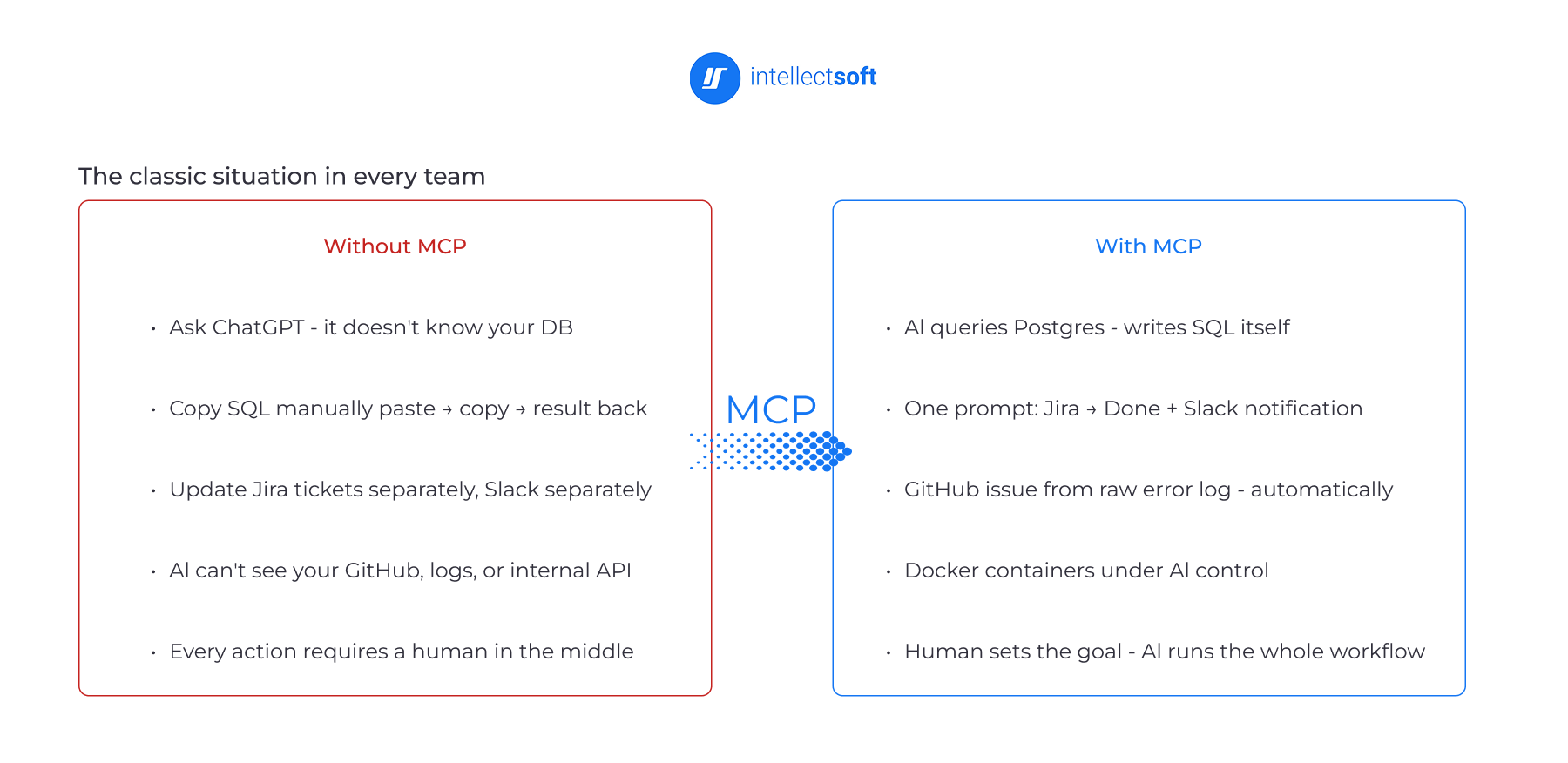
Without MCP, AI is a standalone assistant. What does it mean? It can answer questions and make suggestions. But it can’t directly access your database, internal tools, or business applications. Is it okay? Of course, nope. Employees must copy data between systems, update tickets, send notifications, and perform other routine tasks on hand.
With MCP, AI is an integrated part of your daily workflows. It’s a secret sauce of AI integration as it can connect to your infrastructure and swiftly find relevant information. In addition, thanks to MCP, AI can interact with tools such as GitHub, Jira, Slack, and databases. So you can focus on strategy while AI executes the workflows. So you don’t need to manage every step manually.
To sum up, with MCP, AI shifts from its role of text producer to an active participant in business and engineering. MCP has become a catalyst for AI agents in delivering enterprise value.
How Model Context Protocol Works
At first sight, MCP may seem complex, but its architecture is plain. It follows a Host → Client → Server architecture that allows AI solutions to securely communicate with external tools and data sources.
Companies don’t need to build custom integrations for every system, but use MCP to create a consistent connection layer between AI and enterprise infrastructure. Let’s see how every component of the MCP architecture works.
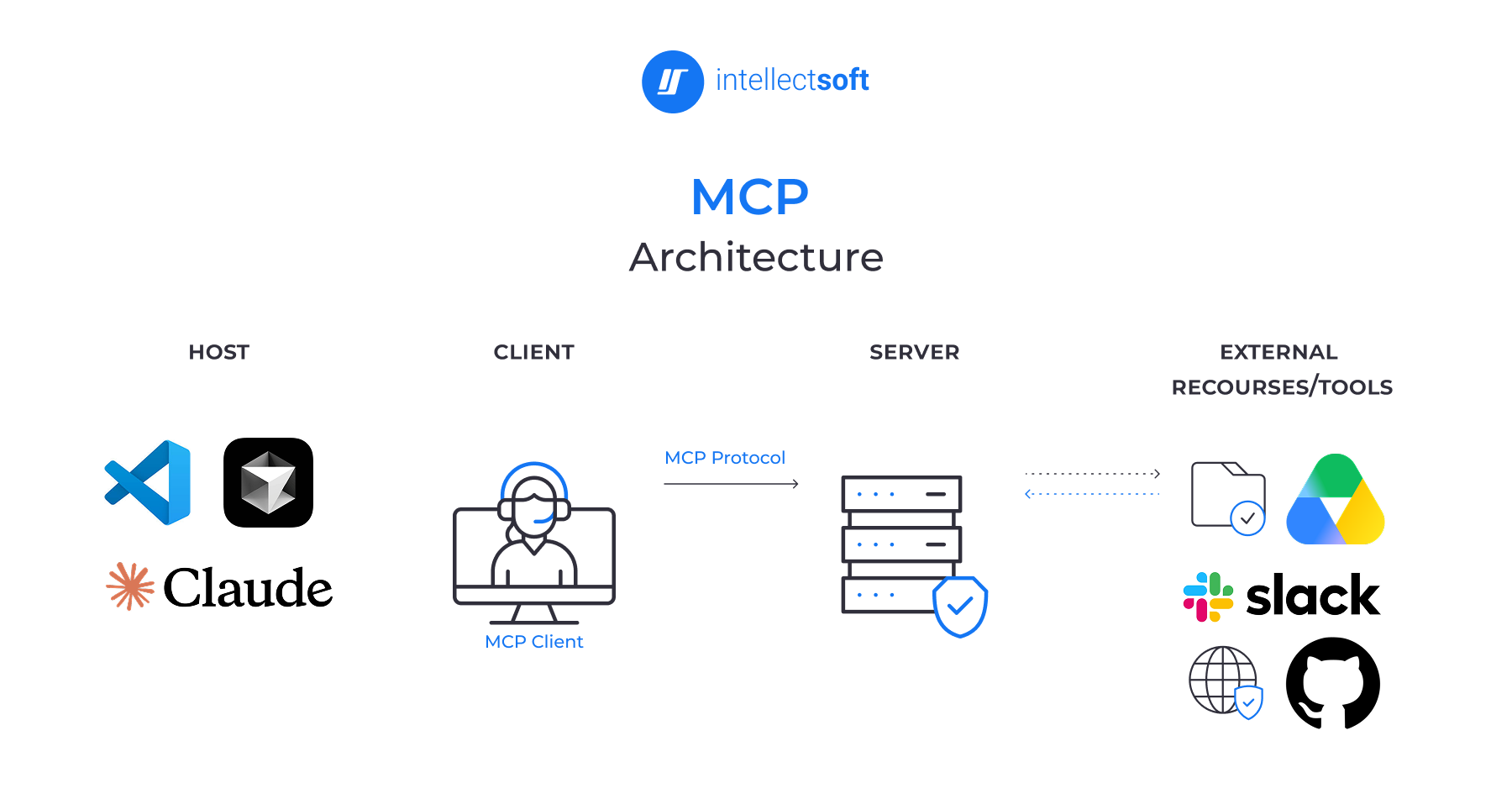
- MCP Clients: These are AI apps that interact with users and communicate with MCP servers. When a user submits a request, the client finds the right tools and data sources, interacts with MCP servers, and helps the AI complete the task. In simple terms, the client connects the AI model to external systems and business data.
- MCP Servers: MCP servers let AI access enterprise tools and data. They can connect AI to CRMs, databases, and other business systems. MCP servers also control what AI can and cannot access. This helps to secure sensitive information.
- Data flow: When a user submits a request, the AI determines which datasets are needed to complete it. Then, the MCP client finds the relevant tools and data sources through the MCP servers. Finally, AI processes the outputs and delivers a response to the user.
All in all, MCP allows AI to work with real business systems and data in real time and go beyond its training data.
What Can AI Access Through MCP?
One of the key superpowers of MCP is that it standardizes how AI systems interact with external sources. Through the Model Context Protocol, AI can access tools, resources, and prompts. Let’s review them as they provide the context and functionality needed to complete real business tasks!
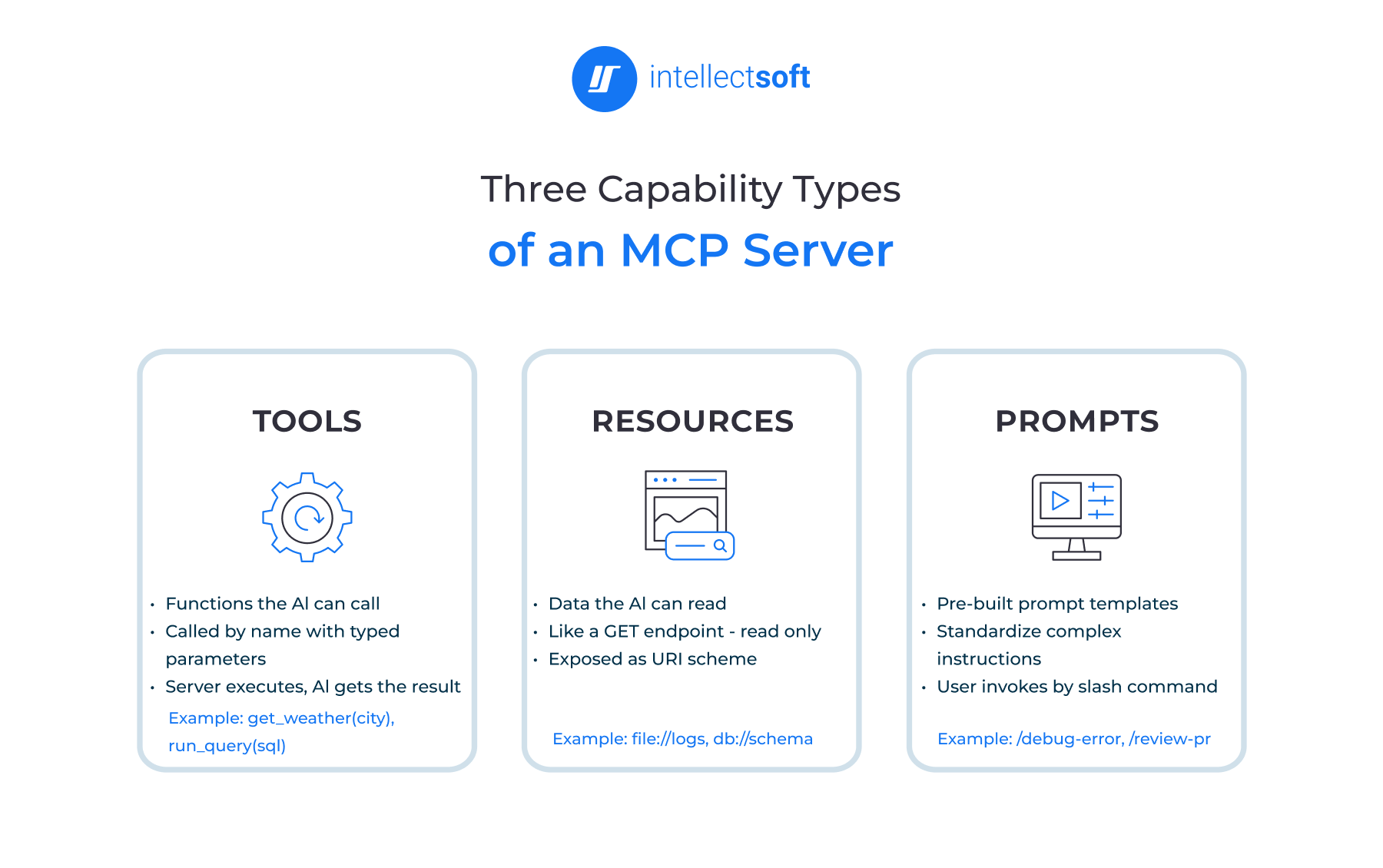
Tools: actions AI can perform
First, we’ll focus on tools. They allow AI to integrate with other systems and take action. They turn AI into a doer. An AI assistant can create a Jira ticket, reply to a Slack message, search a PostgreSQL database, or update records in a CRM – all this saves your team’s time and cuts the number of routine tasks. AI completes repetitive work, while your employees focus on strategic and creative roles.
Resources: data AI can access
Another external source of AI intelligence is the resources or data it can access. This is all information stored in business systems, and thanks to MCP, AI can use it. CRM records, support tickets, internal documentation, inventory databases, knowledge bases, or API responses – all these can be used as resources for your AI tool. Shift from training data to real-time business data is a good way to benefit from statistical algorithms.
Prompts: reusable instructions and workflows
The quality of an AI system's work also depends on the prompts it relies on. No doubt, prompts define how generative AI performs specific tasks. You need a lot of time to create prompts for every task. But it’s possible to generate reusable instructions for internal knowledge retrieval, data analysis, or customer support. Indeed, it’s a good way to standardize interactions and achieve more consistent results.
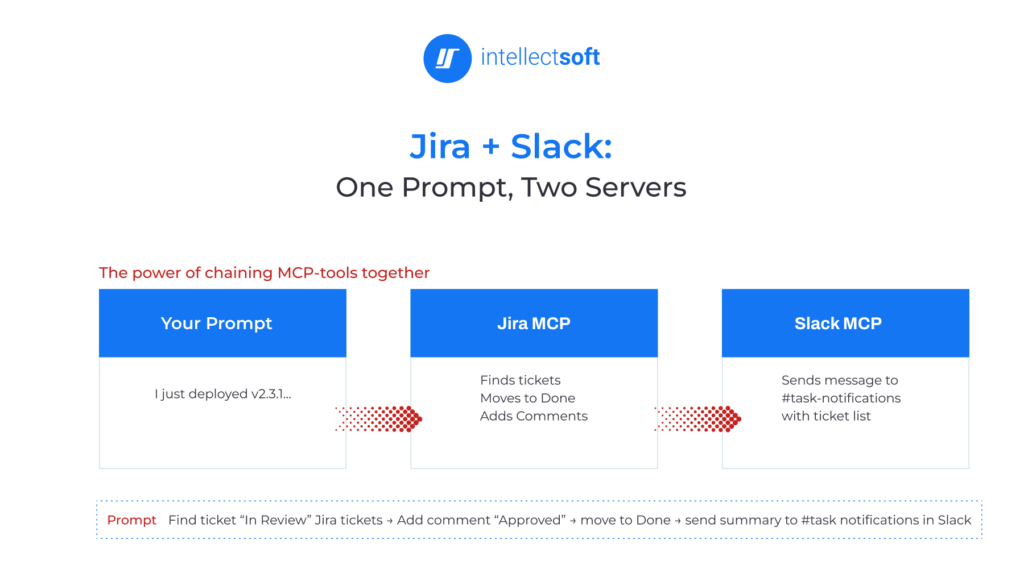
This diagram shows how an AI can use the Model Context Protocol to connect separate apps without any custom integration code. With just a single text prompt, AI can automatically find and update Jira tickets, seamlessly posting the summary to Slack.
Why AI Systems Need Access to Enterprise Infrastructure
Many businesses feel frustrated while integrating AI without understanding where it can be applicable and how to grow it with data. And if you hear thoughts that AI is just a hype and AI-backed systems don’t work with enterprise infrastructure, don’t listen to them. They just failed to connect it properly and feed it with the latest data. So let’s clarify why it’s vital to ensure AI systems have access to your infrastructure!
- Access to real business data instead of relying solely on training data and generic knowledge.
- Precise, relevant outputs tailored to your customers, operations, and processes.
- Everyday workflow automation across Jira, Slack, GitHub, ERP, and CRM systems
- Higher performance and efficiency through less manual effort and more emphasis on strategic tasks.
AI can become valuable when it can access your enterprise infrastructure via MCP and deliver outputs based on your datasets. That is the reason why the MCP is a kind of bridge between artificial intelligence and your business system.
What AI Integration with MCP Can Do for Your Business
Thanks to MCP, companies see significant improvement in both AI capabilities and development team productivity. But let’s review what gains you can receive from AI integration with MCP!
Faster AI software development and integration
With MCP, you build AI systems faster and more easily. Your developers don’t need to write custom code for every integration. They can use ready-made MCP servers or quickly build one using a standard template.
What used to take days can now be done in hours if you connect via the Model Context Protocol. Plus, when they build an MCP server, they can reuse it across different AI systems and agents. So businesses can test their ideas faster. They can plug in different MCP connectors and run multiple AI use cases in parallel.
Improved AI responses and relevance
Integration of AI with MCP is a great way to make your AI model more accurate and practical, as it pulls real-time, fresh data and doesn’t rely on outdated training datasets. As a result, AI captures the full context and nails it faster, saving time and boosting productivity.
Becoming more intelligent, AI can answer precisely about your processes, documents, and customer data. For instance, if you code with AI, it can detect issues in your code and offer fixes.
Multi-step task automation
Certainly, AI integration using MCP makes statistical algorithms more advanced. In what way? It enables AI to manage tricky multi-step tasks that involve many tools. So your intelligent system doesn't need to switch between apps. It can move between applications and carry out the full workflow.
For example, AI can check a calendar, schedule a meeting, send invitations, update records, and notify the team – all from one prompt. MCP turns AI into a digital assistant that keeps everything in sync and completes tasks with minimal human help.
Reduced complexity and fewer errors
Feel tired from building and keeping separate integrations for every tool? Sure, it can drain valuable engineering resources and kill a lot of time. As an MCP serves as a bridge between AI and business systems, it gets rid of the need to connect each tool separately. So this speeds up development, minimizes errors, and simplifies upkeep.
With the Model Context Protocol, your AI ecosystem is more stable. Even if a tool is updated, it can keep working with AI. MCP is also fast and lightweight, helping AI get the information it needs without slowing things down.
Reusable integrations across AI platforms
Yes, it’s absolutely tiresome to create separate connections for every AI tool you use. Luckily, with MCP, you can build an integration once and use it across different AI models and platforms.
For example, the same Slack integration can work with different AI assistants that support MCP. How does this help you? You save development time, cut costs, and plant seeds for tomorrow when it comes to the adoption of new AI technologies. This answers the question: how does AI reduce costs? It reduces the need to build the same integration multiple times and lets you use it across different AI platforms.
Stronger security and more control
With MCP, all actions go through a single location where they are monitored and logged. So this makes AI safer and easier to control. You don’t need to connect AI to random APIs, as everything is managed through a central system.
You can set rules for what AI may access, so it can use only approved connections. Your data stays secure and allows AI to operate within defined limits. MCP gives more control and stronger security when using AI.
Before the emergence of the Model Context Protocol, you needed to wait for weeks to add a new data source and build a custom integration. It was slow, tiresome, and involved engineering work. With MCP, an analyst can connect a new data source and get insights instantly. Plus, they can add data in real time during a meeting and answer questions on the spot.
How Intellectsoft Helps Enterprises Implement MCP
At Intellectsoft, we help businesses connect AI to their enterprise infrastructure using MCP to ensure that they will benefit the most from their AI solutions. Here are a few steps we follow:
- Step 1. Assessment of AI use cases and data readiness: We analyze your business needs and identify processes where AI can add real value. We also evaluate your data and systems to make sure they are ready for AI integration.
- Step 2. Rapid Proof of Concept: Our team builds a prototype, a simple working version, fast. That’s why you can see how it can work in a real-life setting before making heavy investments.
- Step 3. Infrastructure integration and deployment: We connect AI to your existing tools and systems using MCP. So everything works securely and without disruption.
- Step 4. Optimization and scaling: Once your AI solution is ready, we fine-tune it, increase performance, and scale it across your business.
Ready to bring MCP into your enterprise? Let’s talk and discuss how we can help you design and implement AI that actually works in your business.
FAQ
What is Model Context Protocol?
MCP is an open standard developed by Anthropic. It enables AI systems to securely connect with external data sources, applications, and tools. The value of MCP is that it standardizes how AI accesses business information, making AI systems more context-aware and intelligent.
How does MCP work?
MCP follows a Host → Client → Server architecture. The AI app sends requests through an MCP client. Then, the client securely connects to the right tools and data sources through MCP servers.
Why do AI systems need access to enterprise infrastructure?
AI can provide generic answers if it fails to access your business systems. If you connect AI to your infrastructure through MCP, it can work with real-time data from CRMs, internal documents, and other tools your business uses.
What problem does MCP solve?
MCP removes the need for custom integrations between AI and every system. So the connection between AI and apps is faster and more consistent. Plus, MCP reduces complexity for developers as they don’t need to build connections for each tool. This is the way to save time and prevent errors.
Is MCP secure?
Yes, MCP is secure. It includes access controls and permissions. So you can decide what data and systems AI can access.
What are the benefits of MCP for businesses?
MCP helps improve AI accuracy, automate workflows, reduce manual work, speed up integrations, and extract more value from existing systems and data.
